
What is Delegate Access?
Delegate Access allows you to invite collaborators to work within your LiGo workspace without sharing your login credentials. You can assign different permission levels based on their role – from fully managing the account to simply viewing what's happening.
Available Roles and Permissions
| Rôle | View Content & Analytics | Create & Publish Posts | Edit Account Settings | Manage Billing | Invite Other Delegates |
|---|---|---|---|---|---|
| Administration | ✅ Oui | ✅ Oui | ✅ Oui | ✅ Oui | ✅ Oui |
| Rédacteur en chef | ✅ Oui | ✅ Oui | ✅ Oui | ❌ Non | ❌ Non |
| Téléspectateur | ✅ Oui | ❌ Non | ❌ Non | ❌ Non | ❌ Non |
Important Notes:
- No delegate can currently access your CRM data (My Leads section) or generate comments using the Chrome Extension on your behalf.
CRITICAL: Only the account owner can connect their LinkedIn profile to their LiGo account.
- Delegates cannot use the Profile Switcher or any other method to link LinkedIn accounts to accounts they have delegate access to. The LinkedIn connection must be done by logging into the actual account owner's LiGo account. This restriction exists for security and authentication purposes - there is no workaround for this limitation.
Key Use Cases
1. Pour les fondateurs et entrepreneurs en solo travaillant avec des nègres littéraires
Give your ghostwriter or virtual assistant access to create and schedule content through LiGo without sharing your LinkedIn credentials. They create the posts, while you maintain control of your account.
2. Pour les organisations qui gèrent des programmes de contenu généré par les employés
Faites gérer le contenu LinkedIn de plusieurs cadres à votre équipe des réseaux sociaux depuis un seul tableau de bord. Chaque cadre connecte son LinkedIn une fois, puis votre équipe de contenu s’occupe du reste.
3. Pour les agences gérant plusieurs comptes clients
Gérez toutes les stratégies LinkedIn de vos clients via votre propre tableau de bord LiGo après que les clients vous ont donné accès. Chaque client conserve la propriété de son compte pendant que vous pilotez sa stratégie de contenu.
Alternatively, you can create a separate LiGo account for each client and give yourself delegate access to those accounts. This allows you to maintain separate billing, content strategy, and themes for each client.
How to Navigate to Delegate Access
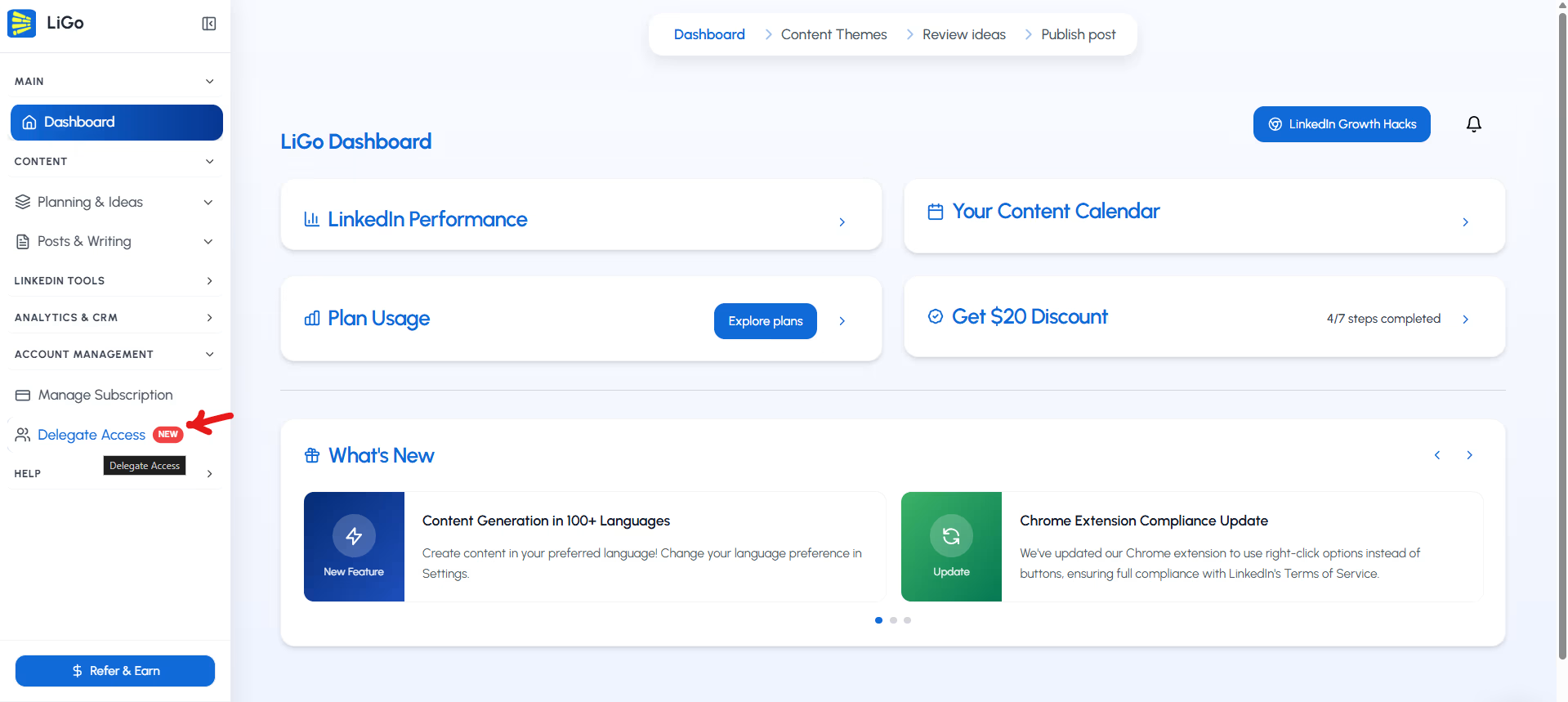
- Log into your LiGo account
- Select the "Account Management" section.
- Sélectionnez l’icône "Delegate Access" Option
How to Setup Delegate Access
- Log into your LiGo account
- Naviguer vers Accès délégué as mentioned above
- Click "Invite Delegate"
- Enter the email address of your collaborator
- Attribuez-leur un rôle : Administrateur, Éditeur ou Visualiseur
- They'll receive an email invitation with setup instructions
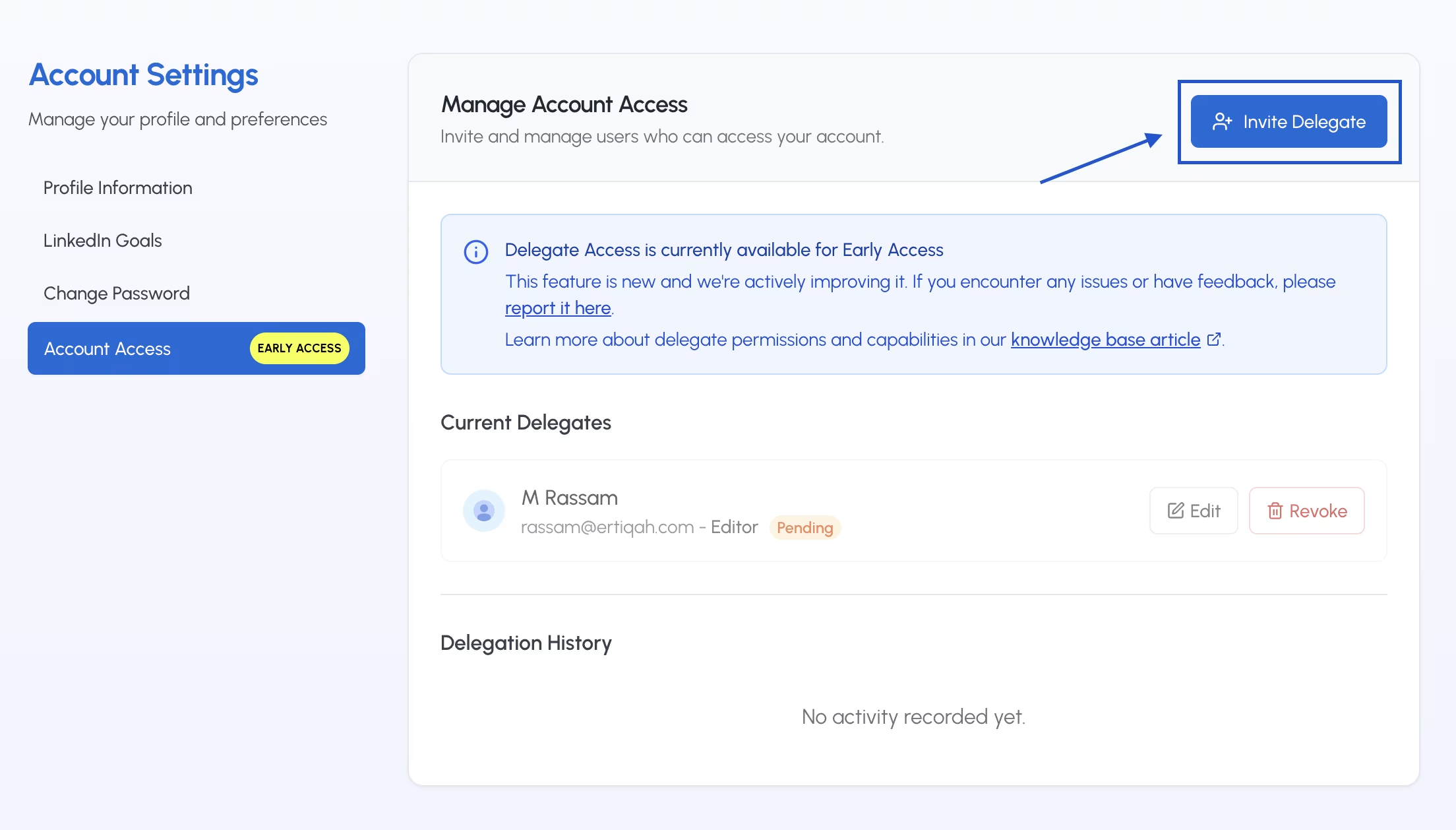
Once completed, your delegate can log into their own LiGo dashboard and take action based on the access level you've granted.
Important : LinkedIn connection permissions expire after 60 days (sometimes sooner; this is by LinkedIn and is a standard security procedure to ensure refreshing of your authentication information periodically). Whenever the connection expires, or is about to expire - we send the email to the account owner - so that they can refresh their LinkedIn connection to LiGo.
Account owners need to reconnect their LinkedIn account every two months to maintain uninterrupted publishing. Remember, only the account owner can perform this reconnection - delegates cannot do this on behalf of the owner.